Working with Klo
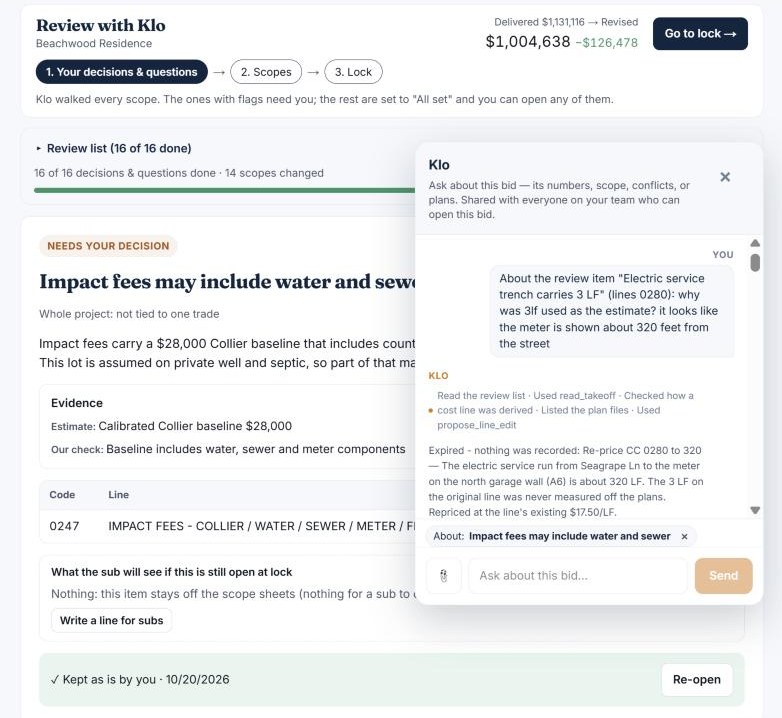
Klo is the assistant built into every bid. It has read the same plans the estimate came from, and it knows the takeoff, every cost line, the scope of work, the conflict report and the verification notes.
Open Klo
Click Klo at the bottom right of any delivered bid. During Review & Lock it docks beside your review list, and Work it with Klo on any item opens it with that item already loaded.
What to ask
Talk to it the way you'd talk to your estimator:
- "Why is the electric trench only 3 LF? The meter looks 320 feet from the street."
- "Which sheet did the window count come from?"
- "What happens to the estimate if the client switches to a metal roof?"
- "Draft a reply to the framer asking what's excluded from his number."
Klo looks at the plan sheets, cost lines and takeoff to answer, and shows what it checked.
Klo proposes, you approve
Klo never changes your bid on its own. When a change makes sense, it shows a card with the change and the reason. Approve or Skip. Approved changes are recorded with your name, like any change you make yourself.
It can also send requests for bid from the chat. That takes two steps: it prepares them, and sends only after you confirm in your next message.
Attach files
Use the paperclip to attach a PDF, PNG or JPEG up to 25 MB: an updated sheet, a sub's quote, a photo of a markup. It's saved to the bid's documents so Klo, and your team, can use it.
One thread per bid
Each bid has one Klo conversation, shared with everyone on your team who can open that bid. Teammates with view-only access can ask Klo anything, but can't approve changes.
Klorra deliverables are budgeting and planning tools, not warranted bids. Every quantity and rate is the builder's responsibility to verify before commercial use. Terms §3.