Review & Lock: Make the Estimate Yours
The delivered estimate is Klorra's best read of the plans. Review & Lock is where you turn it into your number: your subs' pricing, your allowances, your calls on what the plans leave open. The delivered version is never overwritten. Your changes build a revised estimate next to it.
Start the review
Open the Review & Lock tab. You'll see the delivered total and three cards:
- Decisions: big-dollar lines Klo isn't sure of.
- Questions: things the plans don't say.
- Scopes: each trade's scope sheet.
Klo builds your list in the first 2–3 minutes. Click Start review with Klo →. If you're happy with the estimate as delivered, Skip review and lock as delivered is there too.
Work each item
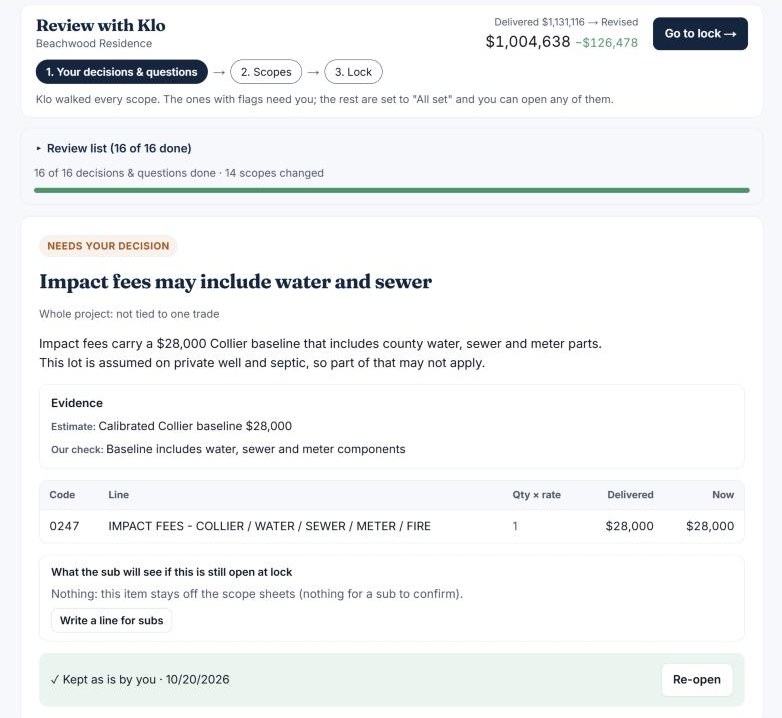
Each item shows what Klo found, the evidence, the cost lines involved, and the delivered and current amounts. Under What's right for this job? you pick one:
- Keep as is. Add a note if you like, and mark it Still waiting on the client, architect or engineer if you don't have the answer yet. Waiting items stay flagged on the lock screen.
- Change quantity / price. Enter quantity × unit price, or a line total. Klo's suggestion can be filled in for you, or use your own numbers. Pick a reason: Quantity was wrong, Scope was missing, Plans say otherwise, Price / rate was wrong, My budget call or Client's choice.
- Change the takeoff. Fix a measured quantity, and every line that uses it re-prices live. You can undo takeoff changes until you lock.
- Work it with Klo. Opens Klo next to the item to talk it through. See Working with Klo.
You can change unit prices on any plan, so the estimate matches what your subs actually charge.
Finish each scope
When you're done with a trade, click Done with this scope. Klo drafts updated wording for that trade's scope sheet and the matching section of your scope of work. Approve wording, edit it, set it aside, or ask for a redo with instructions.
The scope sheet is what subs see when you request bids. It carries scope only, never your prices, rates or quantities.
If a teammate is reviewing the same bid, you'll see their name, and Klorra warns you before either of you overwrites the other's change.
Lock it
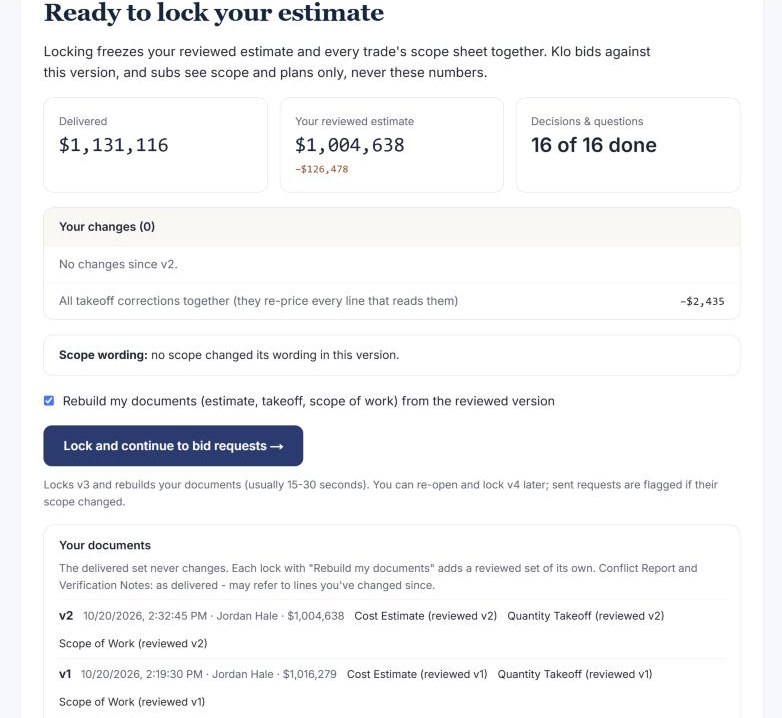
The lock screen shows the delivered total next to your reviewed total, how many decisions are done, and every change in this version.
- Leave Rebuild my documents ticked to get a fresh estimate, takeoff and scope of work for this version. It takes 15–30 seconds.
- Click Lock and continue to bid requests →.
Each lock is a numbered version (v1, v2, v3…) with its own downloads. You can re-open and lock again later. If you already sent requests for bid and a scope changed, Klorra flags it and offers to prepare an update for those subs. Nothing goes out without you.
The conflict report and verification notes stay as delivered, so they may mention lines you've since changed.
Next: Working with Klo.
Klorra deliverables are budgeting and planning tools, not warranted bids. Every quantity and rate is the builder's responsibility to verify before commercial use. Terms §3.