← All chapters
Revised Plans: Update a Bid When the Drawings Change
Architects revise. When they do, you don't start over. Upload the new set to the same bid and Klorra works out what changed.
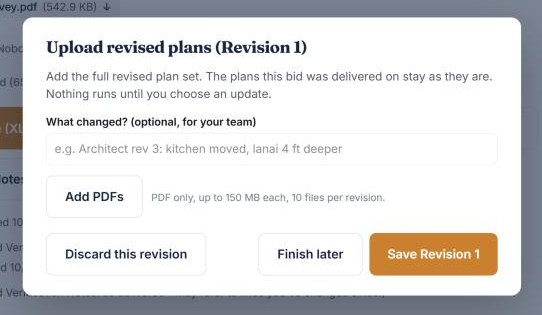
Upload the revision
- On a delivered bid, click Upload revised plans.
- Add the full revised set (PDFs, up to 150 MB each, 10 files per revision).
- Optionally note what changed, for your team. For example: "Architect rev 3: kitchen moved, lanai 4 ft deeper."
- Save the revision. The plans the bid was delivered on stay as they are, and nothing runs until you pick an update.
Choose an update
Either option uses one bid credit, refunded if it fails.
- Quick update. Klo finds the sheets that changed and proposes the takeoff and line changes in your review. Best for a revision that touches a few sheets.
- Full re-run. The whole pipeline runs again on the new set. It takes one to two hours, you get an email when it's ready, and you can compare it side by side with the earlier version. Best when the house itself changed.
Compare and adopt
The Plan versions panel shows each version, with Current estimate and Newest plans labels.
- Compare versions: two versions side by side, or the full history.
- Adopt this revision when you're ready to work from it.
- Changes you made in review on the earlier version can be carried over or left behind, one at a time. Klo proposes each one and you decide.
Next: Team access.
Klorra deliverables are budgeting and planning tools, not warranted bids. Every quantity and rate is the builder's responsibility to verify before commercial use. Terms §3.