Team Access: Invite Your Estimators and PMs
Klorra works best with the people who already do your estimating. Bring them onto your account so they can review bids, work with Klo and send requests for bid.
Seats
| Plan | Seats |
|---|---|
| Pay-as-you-go | 1 |
| Builder | 1 |
| Pro | 3 |
| Studio | 10 |
The owner, active members and open invitations all count toward seats.
Invite someone
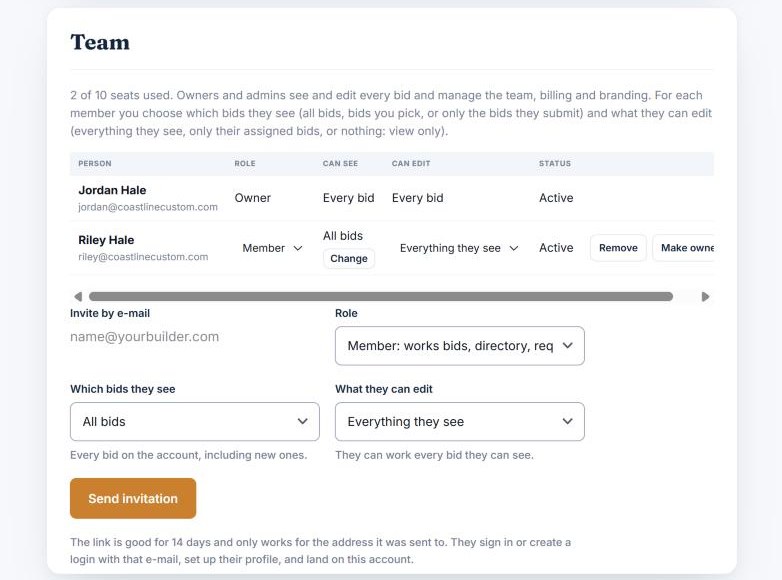
Go to Settings → Team (owners and admins) and fill in Invite by e-mail:
- Role. Member works bids, the directory and requests for bid. Admin can do everything, including billing and the team.
- Which bids they see: all bids, selected bids, or only their own. Tick Also see new bids automatically if you want new jobs to appear for them.
- What they can edit: everything they see, assigned bids only, or view only.
The invitation link is good for 14 days and only works for the address it was sent to. They sign in or create a login with that email, set up their profile, and land on your account.
Day to day
- Assign people to a bid from the bid page. Assignees get the "bid ready" and sub-reply emails.
- The dashboard gains By and Assigned columns, filters by person, and a Recent activity feed.
- Klo's conversation on each bid is shared by everyone who can open it.
- View-only teammates can read everything they can see and ask Klo questions, but can't submit bids, change the directory or change a bid.
The owner can change roles, remove people, and transfer ownership. A member can leave the team at any time.
Next: Plans, billing and settings.
Klorra deliverables are budgeting and planning tools, not warranted bids. Every quantity and rate is the builder's responsibility to verify before commercial use. Terms §3.