← All chapters
Your Directory of Subs and Suppliers
The Directory is your list of trade partners. Requests for bid go to the partners tagged for each trade, so a tidy directory means one-click bid requests.
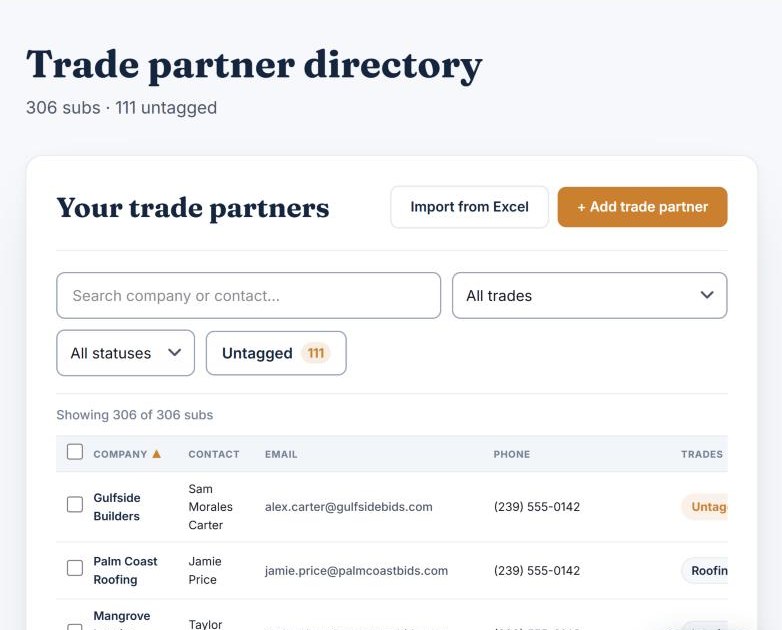
Add partners
+ Add trade partner opens a form:
- Company name (required), contact, email, phone, region and license number
- Trade packages they bid on
- Status: Active, Prospect, Do not use or Not a bidder
- Certificate of insurance on file, W-9 on file, and notes
Import from Excel
Import from Excel takes an .xlsx or .csv with the columns Company (required), Trades, Contact, Email and Phone. Download the template from the import window.
- Companies already in your directory are skipped, and so are duplicates within the file.
- Any trade name Klorra doesn't recognize is listed back to you so you can tag it.
Keep it current
- Search by company or contact, and filter by trade or status. Untagged shows partners with no trade yet, who won't get requests until you tag them.
- Select several rows to bulk-edit status, trades, COI, W-9 or region.
- Owners and admins can bulk-delete. View-only teammates can look but not change anything.
Tip: give every active partner an email and at least one trade. Those are the two things a request for bid needs.
Next: Revised plans.
Klorra deliverables are budgeting and planning tools, not warranted bids. Every quantity and rate is the builder's responsibility to verify before commercial use. Terms §3.