Requests for Bid: Get Prices from Your Subs
Once your estimate is locked, Klorra can send a request for bid to every trade partner on every package, collect their replies, and record their numbers in Buyout.
Step 1: Set your bidding address (once)
Go to Settings → Bidding (owners and admins). Pick the name in front of @bids.klorra.ai. Klorra suggests one from your company name.
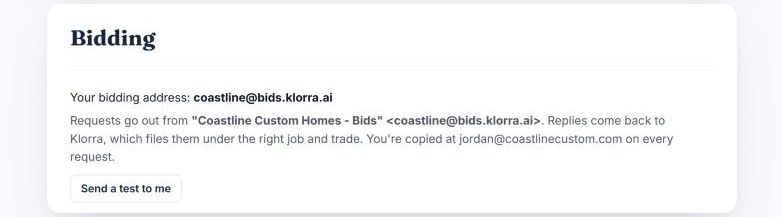
- Requests go out from "{Your Company} - Bids" yourname@bids.klorra.ai, and you're copied on every one.
- Replies come back to Klorra, filed under the right job and trade.
- Use Send a test to me to see exactly what a sub receives.
- The address is set once, because requests already out carry it. To change it, email support.
You also need at least one trade partner with an email in your Directory.
Step 2: Review the drafts
On the Buyout tab, open ▸ Send requests for bid.
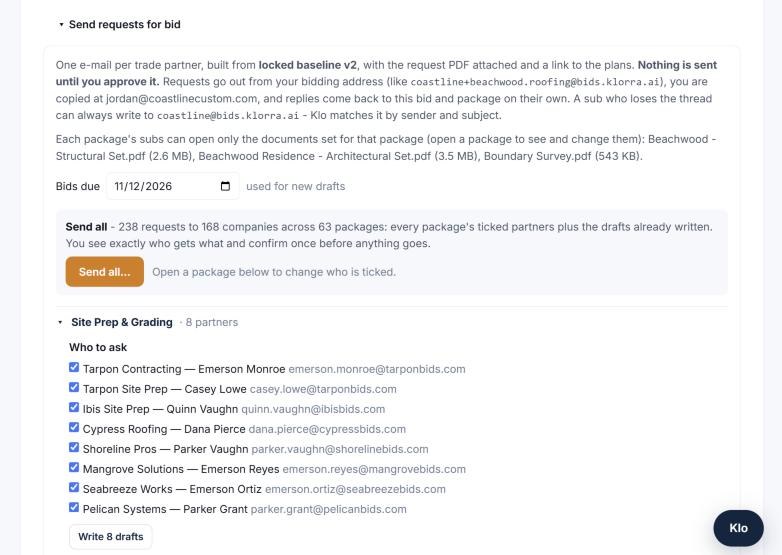
- Set the Bids due date.
- Open a package to see Who to ask: every partner in your directory tagged for that trade. Untick anyone you don't want.
- Click Write drafts. Klorra writes one email per partner, built from your locked estimate, with the request PDF attached and a link to the plans.
- Edit any draft: contact, subject, body. Send a test to me works here too.
- Choose which plan files each package's subs can open.
▸ Requests for bid (PDF) shows the request each trade will get. It carries scope only, never your prices, rates or quantities. If a package would show a sub one of your numbers, it's blocked until you fix it in Review & Lock.
Step 3: Approve and send
Nothing is sent until you approve it.
- Send one package at a time, or Send all… to review everything that's about to go out and confirm once.
- If a package has fewer than 3 bidders, Klorra asks you to OK it first.
- Sends go out spread over about 90 minutes so they read like they came from a person. Stop sending the rest is there if you change your mind.
- Subs get a no-login page with the plans and the request PDF. They can't see anything else on your account.
Bid it out is a paid add-on, charged per job at the first real send and covering that job for 90 days: $199 on pay-as-you-go, $149 on Builder, $99 on Pro (2 a month included) and $79 on Studio (10 a month included). Tests are free.
Step 4: Replies come back to the bid
▸ Bid replies has one conversation per trade partner.
- Klo reads every reply. When a bid is clear, Klo records it in Buyout. Anything uncertain waits for you, with Klo's read of the base price, what's included and the options.
- Record as bid, Replace their recorded bid, Have Klo draft a reply, or Draft reminders for subs who haven't answered.
- Every outgoing message is a draft until you approve it.
- You get an email when a sub replies.
Step 5: Level with Klo
In a package's leveling grid, Have Klo level these bids. Klo compares what each bidder left out against the scope, quotes their own words, and suggests a plug to bring each bid to the same scope. Add a plug with one click, or ask Klo to draft a question to the sub. Nothing is sent without you.
Next: Your directory of subs.
Klorra deliverables are budgeting and planning tools, not warranted bids. Every quantity and rate is the builder's responsibility to verify before commercial use. Terms §3.